By Catherine Bouras and Eleni Gkadolou
Dates: 2-4 December 2025
Convenors: Catherine Bouras (École française d’Athènes), Eleni Gkadolou (British School at Athens)
Format: Online and asynchronous
General considerations
Archaeology in Greece Online (AG Online) is an indispensable tool for researchers across all disciplines interested in the latest archaeological discoveries in Greece and Cyprus, this open-access online database—first developed and launched in 2009—regularly collects and presents recent archaeological fieldwork reports to academic researchers and the wider public. Data on fieldwork projects can be retrieved using various search criteria (e.g., toponyms, regions, periods).
Because the platform was created in 2009, AG Online has extensive experience in geolocating its reports and, perhaps more importantly, in improving and enriching its geodata. However, since its launch, methodologies and tools for digital data curation and for acquiring more accurate spatial data have advanced considerably. Earlier entries have not been systematically updated to reflect these developments. The more AG Online interoperates with and links to other tools (e.g., Fasti Online, the Archaeological Cadastre), the greater the need for enhanced data curation. Moreover, in the context of adopting the FAIR principles and Linked Open Data—both of which would increase the resource’s sustainability and interoperability—a review of the existing workflow is essential.
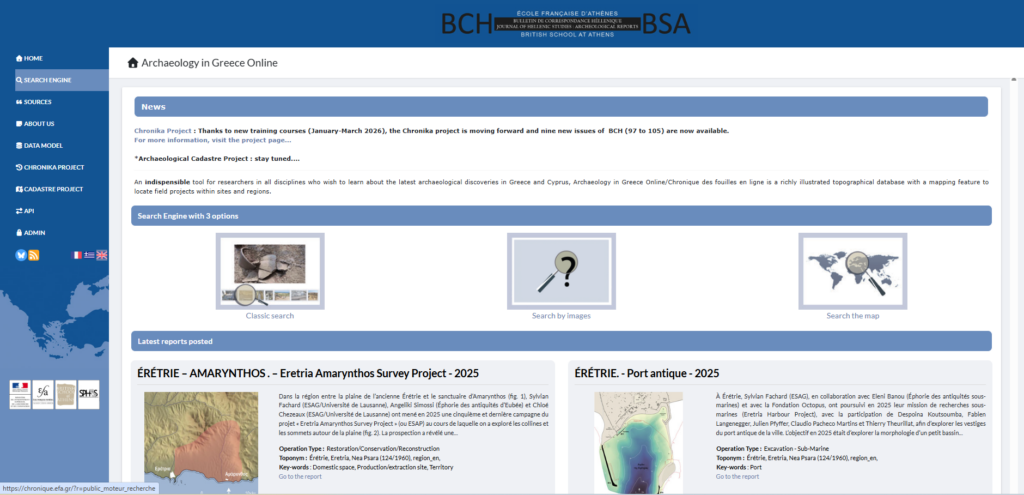
Fig. 1 – Archaeology in Greece Online’s website.
The activity proposed in the framework of the Linked Pasts Symposium 11 held asynchronously and online through 1-12 December 2025, offers hands-on experience in curating geodatasets from AG Online’s platform, it is organised as a hackathon, bringing together several participants with relevant interest and experience in the challenges posed by places and ancient places in Greece.
Points for improvement
Official Administrative Units: The Hellenic Statistical Authority provides four levels of detail as free datasets: Regions, Regional Units, Municipalities, and Local Communities. These datasets consist of polygons and can therefore support spatial searches, spatial analysis, and the spatial organization of data. They can also assist in creating clusters of points that indirectly form conceptual areas (e.g., through Thiessen polygons), which may be used as references for spatial searches and the allocation of new toponyms.
Toponymic reference (Used Toponyms):
A good practice for improving data quality and updating the database is to align it with the most up-to-date and official gazetteers, such as the Official Greek Toponyms of ΓΥΣ and/or GeoNames. The former is also used by the Archaeological Cadastre database, while the latter is widely adopted and used by the Greek Semantics team (EKT).
Where Web-GIS resources exist for specific areas—containing various geometries, detailed data, and micro-toponyms—they may also be used to correct the naming and location information in the Used Toponyms datasets.
Toponyms of the reports: There are four levels of location of fieldwork: (a) accuracy of the actual location, (b) name, (c) geometry, and (d) completeness of the attribute table. When reliable coordinates are available, they should be used to locate the point directly. If polygon geometries exist (e.g., from a WebGIS), introducing a new layer to store polygons could be considered as an option.
Linking the system to other digital resources:
- The dynamic connection with the Archaeological Cadastre project adds significant new capabilities to the AG Online system.
- Integration with Dipylon’s Mapping Ancient Athens project.
- Links to other existing WebGIS platforms for specific areas (e.g., Sykion).
Introduction of AI for automated extraction of entities from Archaiologiko Deltion—as demonstrated in the case of Dypilon that appears to be a success (a collaboration could be highly productive) or even in the case of Digital Periegisis through annotation on texts (Deltion) (https://nodegoat.abm.uu.se/viewer.p/5/4263/scenario/6/geo/).
Activity report
In the framework of Linked Pasts 11, we held two online meetings, on December 2nd and on December 4th – the time between both meetings was intended for participants to explore and experiment with curating geodata – and offering suggestions.
The first meeting’s purpose on December 2nd was to present the platform and its geospatial system, in order to explain the reasons for the hackathon experiment. The second part of the presentation was dedicated to the activity itself: we explained how to download and edit the datasets prepared for this activity with GIS software (preferably QGIS). Brady Kiesling pointed to the fact that some helpful geographic information was available as downloadable maps on the freshly launched Digital Periegesis platform. He also reminded us that Topostext entities could be available as wikidata items.
Eleni Gkadolou has prepared a polygon layer to use in each project in case new polygons should be introduced in the datasets we were going to edit. Jean-Sébastien Gros (RESEFE) expressed a particular interest in editing the geodata of Thasos: Eleni prepared a new dataset for this.
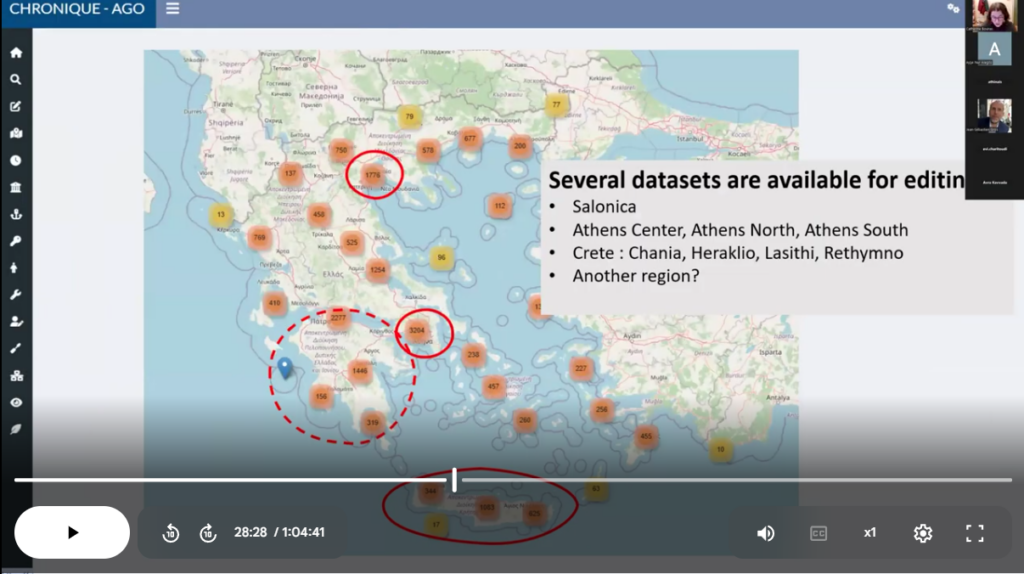
Fig. 2 – Screenshot from the presentation on day one
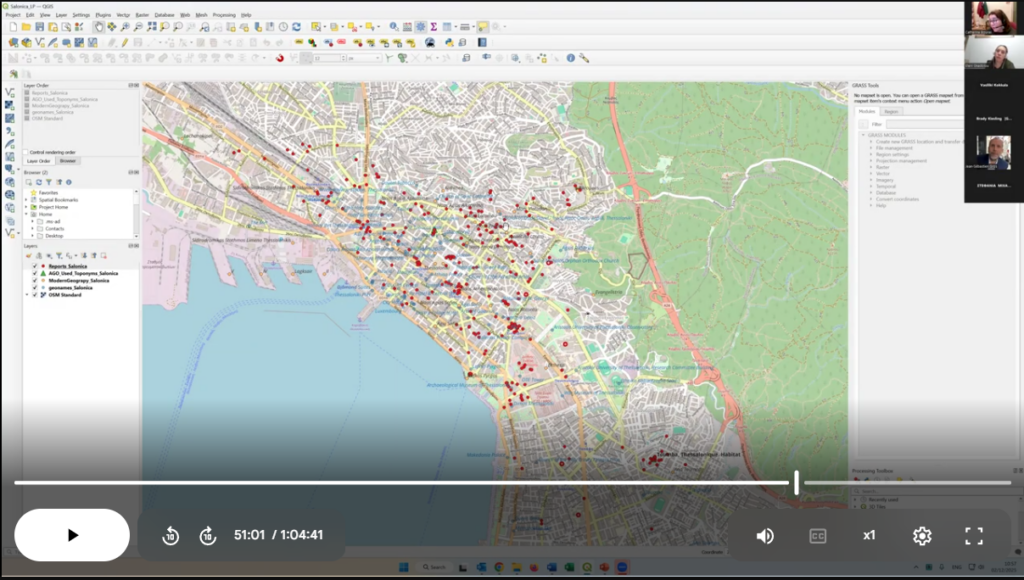
Fig. 3 – Screenshot from the presentation on day one : sample of dataset prepared for the activity
During the second meeting on December 4th, participants shared experiences on the various datasets that each had a chance to work on. Three main areas or topics were explored: Thasos Island, the region of Rethymno, and “Big Cities” (i.e. Athens and Thessaloniki).
– The island of Thasos – Jean-Sébastien Gros downloaded the dataset on Thasos. He edited the polygon layer only: by changing the locations of some points to their correct position.
We discussed the necessity or not to include polygons. Jean-Sébastien thinks not. Catherine Bouras thinks it is important regarding the development of the search tool of AG Online in the near future – it will be possible to search by zones (defined by polygons or radius) and not only by Place name (Toponym) as it is the case now. Catherine thinks it would be useful for Thasos to include well defined sites/zones from the Guide de Thasos in order to provide better map context for reports.
– The region of Rethymno – Stephania Michalopoulou (Independent researcher/archaeologist-zooarchaeologist) has some field experience in Crete and chose to work on toponyms and sites in Rethymno. The outcome was that the majority of toponym entries required to be relocated to locate the modern settlement position more accurately. These entries were enriched in their labels, Wikidata, Pleiades and Geonames id’s fields. Some DSG (Designation) codes were corrected as well.
Some reports coordinates were also corrected and some polygons were added to define important archaeological sites.
Something that she came across several times was an archaeological site (with no ancient site entity association) being tied to the closest modern toponym. How should this be addressed? – keep the modern toponym or add an ancient site entry? Or should there be two toponyms for the same site, seeing that they could be merged?
– Big Cities – The issue with big cities is that the basic toponym database offers very few options within a city to locate many (mainly rescue) excavation reports, when in fact, there are many defined archaeological sites, monuments and sectors that would be more appropriate. In a first attempt to better distribute these records on the map, we had split the city of Athens into seven quarters, following the same distribution as Topos Text suggested. However, an even more precise distribution would be preferrable, given that the context and proximity to well defined sites or monuments is known. The aim of the “Big Cities” export was therefore to experiment with the feasibility of building a micro-gazetteer for Thessaloniki and for Athens.
Vassiliki Kokkala (Museum of Modern Greek Culture/University of Borås) reports on her experiments on the Thessaloniki dataset. While observing the distribution of excavation reports, one can notice several clusters: these mainly depict rescue excavations in relation to the metro stations (modern construction works), whereas others are related to archaeological sites or even wider areas of the city. Vassiliki noted that a gazetteer for byzantine and Ottoman monuments of Thessaloniki would be useful.
Catherine Bouras also reports on Thessaloniki: she has noted the same need for more reference points/polygons within the city. Clusters appear for rescue excavations related to the metro construction. There are also archaeological sites, monuments, churches and areas of the city. Shouldn’t the fortification be mapped as well (even roughly, as simply as reference)?
Catherine Bouras also reports on Athens: same questions as for Thessaloniki. There is a need for more precise reference in Athens: monuments, archaeological sites. She has created polygons for archaeological sites and toponym entries for some of the monuments.
Participants over the three days
Brady Kiesling (ToposText), Jean-Sébastien Gros (RESEFE), Marie Frey (Student/University of Rouen), Vassiliki Kokkala (Museum of Modern Greek Culture/University of Borås), Stavroula Avra Kavvada (Department of History and Archaeology, NKUA), Ayşe Ece Erenhan (Görgünoğlu Psychology Center), Evi Charitoudi (BSA), Bastien Rueff (EFA), Athanasios Dimou (YPPO), Konstantinos Chaïdas (Dipylon Society / Surveying Engineer, MSc in Geoinformatics (GIS)), Stephania Michalopoulou Independent researcher/archaeologist-zooarchaeologist).
To cite this article:
Bouras, Catherine and Eleni Gkadolou. 2026. “Report on Linked Pasts 11 activity. La Chronique en ligne/AG Online geodata hackathon.” Stoa Review. Available: https://blog.stoa.org/archives/4442. DOI: https://doi.org/10.83330/stoareview.4442.